 aymoc写博客的地方
低代码平台中 Core作为插拔式的核心,需要发布出各种事件来让用户在 plugin的基础上实现监听以及拓展。Core中发布的事件大概可以分为一下几类
- 需要根据事件的返回值来决定后面逻辑是否执行
- 异步串行且需要上一个返回值作为下一个参数的入参
Tapable
tapable 是一个类似于 Node.js 中的 EventEmitter的库,但更专注于自定义事件的触发和处理。webpack 通过 tapable 将实现与流程解耦,所有具体实现通过插件的形式存在。
其中基本用法这里不赘述,大部分文章都有介绍。下面介绍下各类钩子的特点
按照执行机制分类
Basic hook
这一类钩子仅仅只是注册然后执行,并不关心每个事件里面的返回值等等。就像简单的发布订阅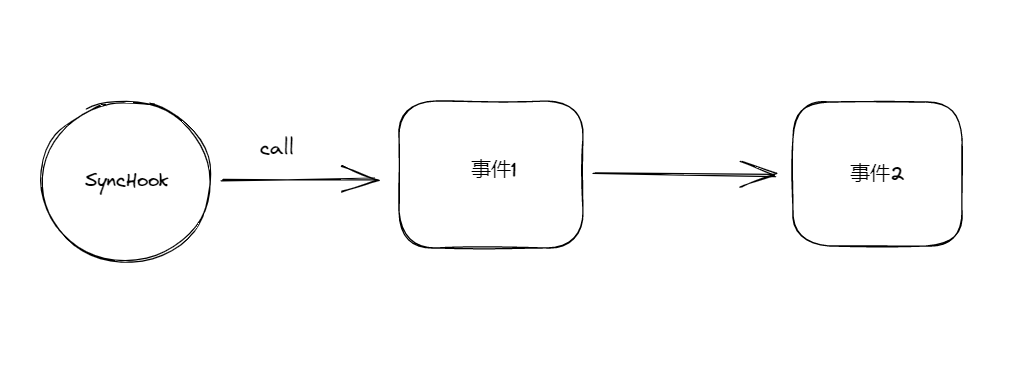
Bail hook
这类钩子会根据事件的返回值如果不为**undefined**来决定下一个事件是否执行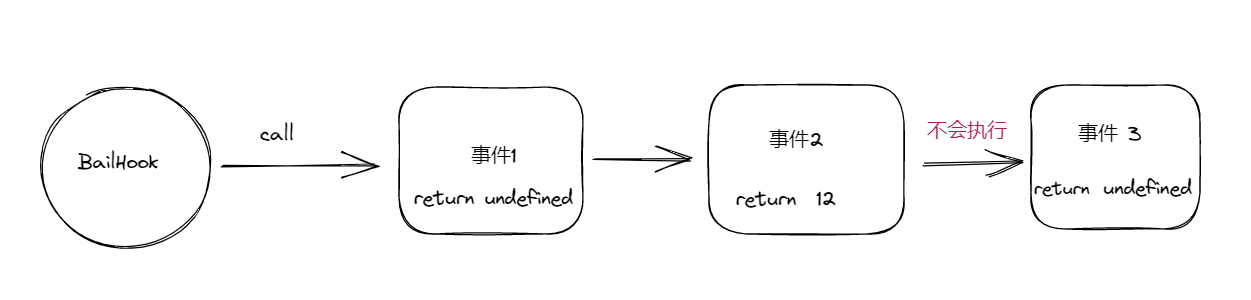
WaterFallHook
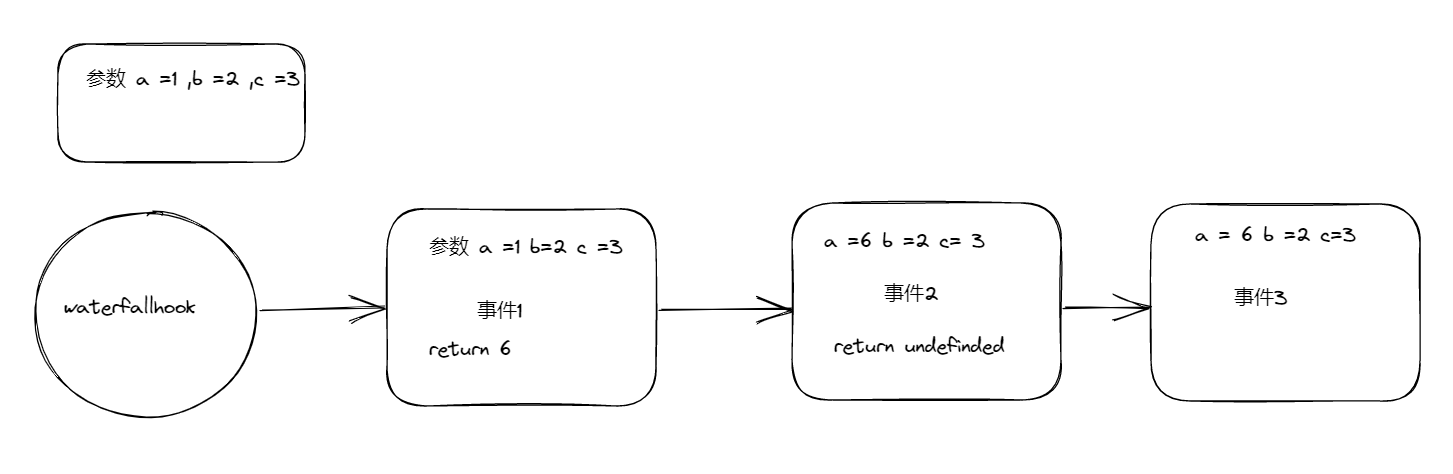
这类钩子会根据事件返回值如果不为undefined来作为下一个事件的第一个参数值。它只能将上一事件的返回值传递给下一个事件第一个参数
LoopHook
这类钩子会根据任意一个事件返回值如果是undefined则回到第一个事件中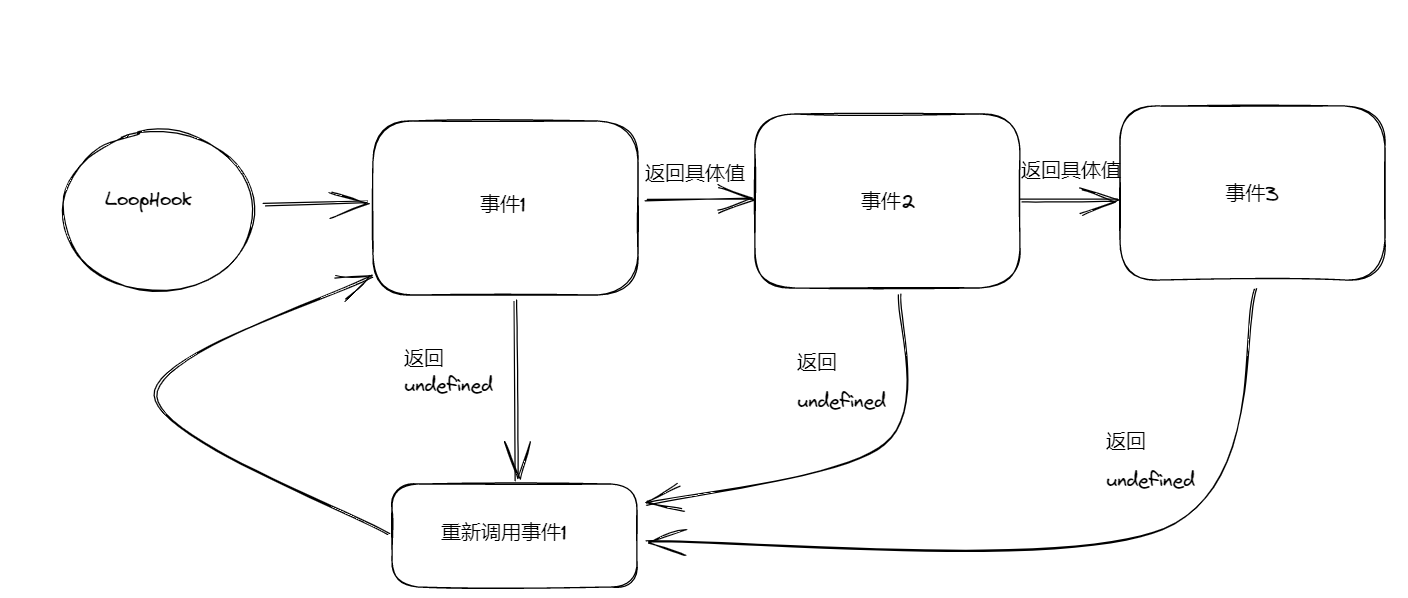
按照同步/异步分类
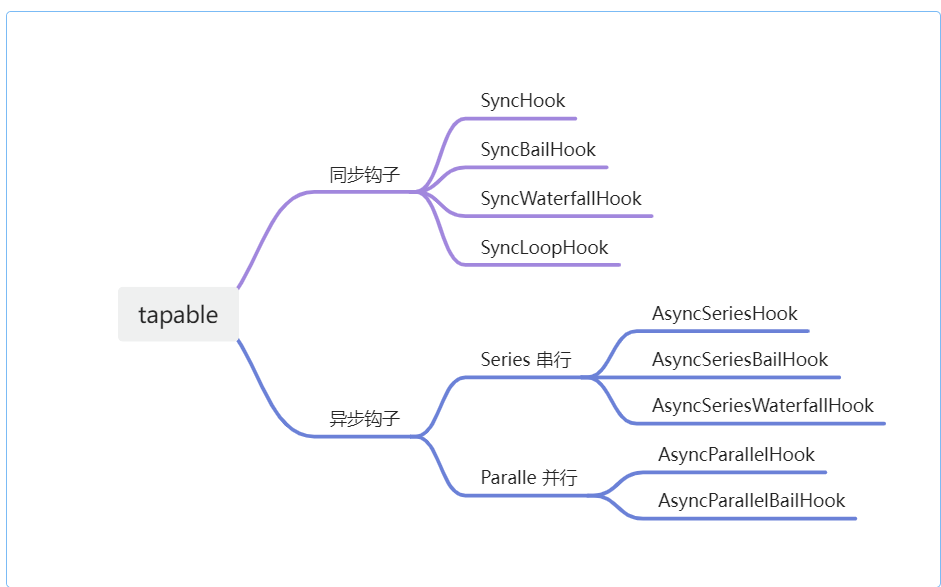
- 同步钩子
只能使用 tap注册,使用 call调用
- 异步钩子
可以使用 tap /tapAsync/ tapPromise来注册,对应callAsync/promise来调用.
【注意】
callAsync/promise调用会执行tap/tapAsync/tapPromise注册的事件- 使用
tap注册的事件没有回调参数callback - 异步钩子注册事件会有而外参数
callback且固定为callback(错误信息,返回值)
源码分析
先来看看看看用法以及调用结果
const { SyncHook } = require("tapable");

// 初始化同步钩子
const hook = new SyncHook(["arg1", "arg2", "arg3"]);

// 注册事件
hook.tap("flag1", (arg1, arg2, arg3) => {
  console.log("flag1:", arg1, arg2, arg3);
  return "github";
});

hook.tap("flag2", (arg1, arg2, arg3) => {
  console.log("flag2:", arg1, arg2, arg3);
});

// 调用事件并传递执行参数
console.log(hook.call("ayomc", "fei", "haoyu"), "result");

// 打印如下
// flag1: ayomc fei haoyu
// flag2: ayomc fei haoyu
// undefined result看起来很简单对吧,这段代码通过 SyncHook 创建了一个同步 Hook 的实例之后,然后通过 tap 方法注册了两个事件,最后通过 call 方法来调用。
实质上这段代码在调用 hook.call("ayomc", "fei", "haoyu") 时, Tapable 会动态编译出来这样一个函数:
function fn(arg1, arg2, arg3) {
  "use strict";
  var _context;
  var _x = this._x; // 这个_x 实际上就是我们注册的函数
  var _fn0 = _x[0];
  _fn0(arg1, arg2, arg3);
  var _fn1 = _x[1];
  _fn1(arg1, arg2, arg3);
}这样看起来 tapable 就干了两件事
- 根据注册的信息动态生成一个
fn - 然后 实例对象 调用这个
fn
实际上还就真干了这两件事,利用 HookCodeFactory 类根据传入参数动态生成 fn ,利用 Hook 类来调用这个动态生成的 fn 。
SyncHook
可看到源码中每个 hook 都是一个单独的文件
const Hook = require("./Hook");

// 这个是重点
const HookCodeFactory = require("./HookCodeFactory");

class SyncHookCodeFactory extends HookCodeFactory {
  content({ onError, onDone, rethrowIfPossible }) {
    // 这里可以自定义hook的各种情况下的回调,返回值
    return this.callTapsSeries({
      onError: (i, err) => onError(err),
      onDone,
      rethrowIfPossible,
    });
  }
}

const factory = new SyncHookCodeFactory();

const TAP_ASYNC = () => {
  throw new Error("tapAsync is not supported on a SyncHook");
};

const TAP_PROMISE = () => {
  throw new Error("tapPromise is not supported on a SyncHook");
};

const COMPILE = function (options) {
  // compile 是每个钩子的核心

  // 初始化信息 存储参数,比如回调函数中有几个参数
  factory.setup(this, options);
  // 创建函数字符串
  return factory.create(options);
};

function SyncHook(args = [], name = undefined) {
  const hook = new Hook(args, name);
  hook.constructor = SyncHook;
  hook.tapAsync = TAP_ASYNC;
  hook.tapPromise = TAP_PROMISE;
  hook.compile = COMPILE;
  return hook;
}

SyncHook.prototype = null;

module.exports = SyncHook;函数一开始将参数传入 Hook 类中。然后又实例化了 Hook ,并给一些 API 添加调用提示,那就进入 Hook 探一探
class Hook {
  constructor(args = [], name = undefined) {
    // 保存调用回调的参数
    this._args = args;
    this.name = name;
    // 保存通过tap注册的内容
    this.taps = [];
    // 拦截器
    this.interceptors = [];

    this._x = undefined;
    this.tap = this.tap;
    // 动态编译的核心
    this.compile = this.compile;

    // this.tapAsync = this.tapAsync;
    // this.tapPromise = this.tapPromise;
    // this._callAsync = CALL_ASYNC_DELEGATE;
    // this.callAsync = CALL_ASYNC_DELEGATE;
    // this._promise = PROMISE_DELEGATE;
    // this.promise = PROMISE_DELEGATE;
  }

  compile(options) {
    throw new Error("Abstract: should be overridden");
  }
}这里只需要搞清楚,在 new SyncHook(args) 时 Tapable 内部究竟保存了哪些属性。
所谓 compile 方法正是编译我们最终生成的执行函数的入口方法,同时我们可以看到在 Hook 类中并没有实现 compile 方法,
这是因为不同类型的 Hook 最终编译出的执行函数是不同的形式,所以这里以一种抽象方法的方式将 compile 方法交给了子类进行实现。
而 compile 将会是我们重点要注意的方法
实现 tap 注册
const syncHook = new SyncHook(["args"], "cxk");

syncHook.tap("xxx", (args1) => {
  console.log(args1); //  rap
});

syncHook.call("rap");

class Hook {
  tap(options, fn) {
    this._tap("sync", options, fn);
  }
  _tap(type, options, fn) {
    if (typeof options === "string") {
      options = {
        name: options.trim(),
      };
    } else if (typeof options !== "object" || options === null) {
      throw new Error("Invalid tap options");
    }
    options = Object.assign({ type, fn }, options);
    // 注册拦截器
    options = this._runRegisterInterceptors(options);
    // 保存回调
    this._insert(options);
  }

  _insert(item) {
    this.taps.push(item);
  }
}大家可能注意到
_tap实际上可以接收一个Object,它的类型大概是这样,我们拦截器章节再详细讲解他
实现 call 调用
上面了解 tapable 如何存储我们监听的回调,下面来分析下是如何调用的
const CALL_DELEGATE = function (...args) {
  this.call = this._createCall("sync");
  return this.call(...args);
};

class Hook {
  constructor() {
    // hook.call 调用方法
    this._call = CALL_DELEGATE;
    this.call = CALL_DELEGATE;
  }
  compile(options) {
    throw new Error("Abstract: should be overridden");
  }

  _createCall(type) {
    return this.compile({
      taps: this.taps,
      interceptors: this.interceptors,
      args: this._args,
      type: type,
    });
  }
}当我们使用 call 的时候实际上还是调用的我们一开始的重写的 compile 方法。
class SyncHookCodeFactory extends HookCodeFactory {
  content({ onError, onDone, rethrowIfPossible }) {
    return this.callTapsSeries({
      onError: (i, err) => onError(err),
      onDone,
      rethrowIfPossible,
    });
  }
}
const factory = new SyncHookCodeFactory();

const COMPILE = function (options) {
  factory.setup(this, options);
  return factory.create(options);
};这样子看来 tapable 的分工就很明确了 Hook 类负责创建上下文存储调用的信息而 HookCodeFactory 则是只需要关注我该如何去生成这个动态函数,然后利用上下文信息去调用。
class HookCodeFactory {
  setup(instance, options) {
    // 储存回调函数,方便后面循环函数个数
    instance._x = options.taps.map((t) => t.fn);
  }

  create(options) {
    this.init(options);
    let fn;
    switch (this.options.type) {
      case "sync":
        fn = new Function(
          this.args(),
          '"use strict";\n' +
            this.header() +
            this.contentWithInterceptors({
              onError: (err) => `throw ${err};\n`,
              onResult: (result) => `return ${result};\n`,
              resultReturns: true,
              onDone: () => "",
              rethrowIfPossible: true,
            })
        );
        break;
    }
    this.deinit();
    return fn;
  }
  init(options) {
    this.options = options;
    this._args = options.args.slice();
  }

  deinit() {
    this.options = undefined;
    this._args = undefined;
  }
  contentWithInterceptors(options) {
    // SyncHook 注册的content方法 调用 串行调用函数体
    //   content({ onError, onDone, rethrowIfPossible }) {
    // 	   return this.callTapsSeries({
    // 	  	onError: (i, err) => onError(err),
    // 	  	onDone,
    // 	  	rethrowIfPossible
    // 	 });
    //  }
    return this.content(options);
  }

  header() {
    let code = "";
    if (this.needContext()) {
      code += "var _context = {};\n";
    } else {
      code += "var _context;\n";
    }
    code += "var _x = this._x;\n";
    if (this.options.interceptors.length > 0) {
      code += "var _taps = this.taps;\n";
      code += "var _interceptors = this.interceptors;\n";
    }
    return code;
  }

  needContext() {
    for (const tap of this.options.taps) if (tap.context) return true;
    return false;
  }

  // 根据this._x生成整体函数内容
  callTapsSeries({ onDone }) {
    let code = "";
    let current = onDone;
    // 没有注册的事件则直接返回
    if (this.options.taps.length === 0) return onDone();
    // 遍历taps注册的函数 编译生成需要执行的函数
    for (let i = this.options.taps.length - 1; i >= 0; i--) {
      const done = current;
      // 一个一个创建对应的函数调用
      const content = this.callTap(i, {
        onDone: done,
      });
      current = () => content;
    }
    code += current();
    return code;
  }

  // 编译生成单个的事件函数并且调用 比如 fn1 = this._x[0]; fn1(...args)
  callTap(tapIndex, { onDone }) {
    let code = "";
    // 无论什么类型的都要通过下标先获得内容
    // 比如这一步生成 var _fn[1] = this._x[1]
    code += `var _fn${tapIndex} = ${this.getTapFn(tapIndex)};\n`;
    // 不同类型的调用方式不同
    // 生成调用代码 fn1(arg1,arg2,...)
    const tap = this.options.taps[tapIndex];
    switch (tap.type) {
      case "sync":
        code += `_fn${tapIndex}(${this.args()});\n`;
        break;
      // 其他类型不考虑
      default:
        break;
    }
    if (onDone) {
      code += onDone();
    }
    return code;
  }

  // 从this._x中获取函数内容 this._x[index]
  getTapFn(idx) {
    return `_x[${idx}]`;
  }
}这部分代码看上非常绕,一下是本身的方法,一下又是调用父类重写的方法。Tapable 中恰恰利用这种设计方式组织代码从而更好的解耦各个模块。让每个 Hook 能够专注于做自己的事情。这是很值得我们学习以及借鉴的地方。
可以看到我们通过 create 这时候就能生成出一个根据 注册信息 以及 new Function 动态生成一个这样的函数
new Function(
  `arg1, arg2, arg3`,
  `
  "use strict";
  var _context;
  var _x = this._x; // 这个_x 实际上就是我们注册的函数
  var _fn0 = _x[0];
  _fn0(arg1, arg2, arg3);
  var _fn1 = _x[1];
  _fn1(arg1, arg2, arg3);
`
);异步 hook
tapable 对异步的处理分为两种
- 回调函数式,通过
callAsync调用,tapAsync注册 - Promise 式, 通过
Promise调用,tapPromise注册
第一种注册调用,将会编译成下面这样
(function anonymous(arg1, arg2, arg3, _callback) {
  "use strict";
  var _context;
  var _x = this._x;
  function _next1() {
    var _fn2 = _x[2];
    _fn2(arg1, arg2, arg3, function (_err2) {
      if (_err2) {
        _callback(_err2);
      } else {
        _callback();
      }
    });
  }
  function _next0() {
    var _fn1 = _x[1];
    _fn1(arg1, arg2, arg3, function (_err1) {
      if (_err1) {
        _callback(_err1);
      } else {
        _next1();
      }
    });
  }
  var _fn0 = _x[0];
  _fn0(arg1, arg2, arg3, function (_err0) {
    if (_err0) {
      _callback(_err0);
    } else {
      _next0();
    }
  });
});可以看到这种就类似于 Promise 还未发展起来时期的,回调函数式来控制异步,上一个函数必须调用 callback 才会执行下一个函数
而对于 Promise 式的调用来说我们也可以看看
(function anonymous(arg1, arg2, arg3, _callback) {
  "use strict";
  var _context;
  var _x = this._x;
  function _next0() {
    var _fn1 = _x[1];
    var _promise1 = _fn1(arg1, arg2, arg3);
    if (!_promise1 || !_promise1.then)
      throw new Error(
        "Tap function (tapPromise) did not return promise (returned " +
          _promise1 +
          ")"
      );
    _promise1.then(
      function (_result1) {
        _callback(null, arg1, arg2, arg3);
      },
      function (_err1) {
        if (_hasResult1) throw _err1;
        _callback(_err1);
      }
    );
  }
  var _fn0 = _x[0];
  var _hasResult0 = false;
  var _promise0 = _fn0(arg1, arg2, arg3);
  if (!_promise0 || !_promise0.then)
    throw new Error(
      "Tap function (tapPromise) did not return promise (returned " +
        _promise0 +
        ")"
    );
  _promise0.then(
    function (_result0) {
      _next0();
    },
    function (_err0) {
      _callback(_err0);
    }
  );
});可选参数
上节我们提到注册 tap 的时候第一个参数实际上可以传入一个对象,它的类型大概是这样
type Tap = TapOptions & {
  name: string;
};

type TapOptions = {
  before?: string;
  stage?: number;
};before&stage
before
我们注册的回调是改变顺序的如果有 before 的话则会插入到这个 监听函数 name 的前面,没有则是插入到最后。
stage
stage 这个属性的类型是数字,数字越大事件回调执行的越晚,支持传入负数,不传时默认为 0.
INFO
如果同时使用 before 和 stage 时,优先会处理 before ,在满足 before 的条件之后才会进行 stage 的判断。 关于 before 和 stage 都可以修改事件回调函数的执行时间,但是不建议混用这两个属性。换句话说如果你选择在你的 hooks.tap 中使用 stage 的话就不要在出现 before ,反之亦然。